
By using this site, you agree to the Privacy Policy and Terms of Use.
Accept
Herald Today
  • More
Reading: How to set up an AirTag
Share
Notification
Donate
  • Local Church News
    Local Church NewsShow More
    The Vanishing: How Kaduna State’s Christian Villages Are Disappearing
    The Vanishing: How Kaduna State’s Christian Villages Are Disappearing
    17 minutes ago
    AFRICA/NIGERIA - Convent, Catholic Hospital, and two Protestant Churches attacked in North-Central Nigeria
    AFRICA/NIGERIA – Convent, Catholic Hospital, and two Protestant Churches attacked in North-Central Nigeria
    1 hour ago
    AFRICA/NIGERIA - Convent, Catholic Hospital, and two Protestant Churches attacked in North-Central Nigeria
    AFRICA/NIGERIA – Convent, Catholic Hospital, and two Protestant Churches attacked in North-Central Nigeria
    2 hours ago
    Nigerian church leaders call for action as 86 Christians still held by Islamists
    Nigerian church leaders call for action as 86 Christians still held by Islamists
    2 hours ago
    Explosive was found in our church -  Abia pastor counters Nigeria police
    Explosive was found in our church –  Abia pastor counters Nigeria police
    7 hours ago
  • World Christian News
    World Christian NewsShow More
    'American Idol' contestant draws ire for singing at TPUSA event
    ‘American Idol’ contestant draws ire for singing at TPUSA event
    57 seconds ago
    Logo
    Boxing: The challenges of world champion Christian Mbilli
    2 hours ago
    Hillary Clinton speaks out on 'toxic empathy' but misses point
    Hillary Clinton speaks out on ‘toxic empathy’ but misses point
    5 hours ago
    What is really going on?
    What is really going on?
    6 hours ago
    A $2 million verdict for victim of 'gender affirming care'
    A $2 million verdict for victim of ‘gender affirming care’
    6 hours ago
  • Business
    BusinessShow More
  • Health
    HealthShow More
    TAKING AFRICA TO THE WORLD STAGE
    4 days ago
    KIDNEY TRANSPLANT
    4 days ago
    MAKE THIS HEALTHY HIGH-PROTEIN LUNCH (Even When You Don’t Have A Plan!)
    5 days ago
    FIBROID SURGERY
    1 week ago
    DELICIOUS HEALTHY GREEN SOUP | Recipe for Cold Weather
    2 weeks ago
  • Technology
    TechnologyShow More
    Nigeria’s data hits 13.2m TB in December as mobile growth plateaus
    4 minutes ago
    Image for the small product module
    This 45W Anker Nano charger with smart display is on sale for only $30
    21 minutes ago
    Image for the small product module
    Sonos home theater gear is on sale for up to 20 percent off right now
    37 minutes ago
    Image for the small product module
    This 512GB Samsung P9 microSD Express card is on sale for 33 percent off
    1 hour ago
    Interswitch Innovation Product Demo Day
    Innovators Lighten up Interswitch Innovation Product Demo Day
    2 hours ago
  • Features
    • Church Events
    • Gospel Music
    • Impact Word
    • Sermons
    FeaturesShow More
    Healing Lives, Restoring Hope
    2 weeks ago
    Seasons Greetings From Revd. Tony Ogugu
    2 months ago
    Rev. Tony Ogugu: Exemplifying Leadership Through Service and Impact
    4 months ago
    Prophesy Is Fulfilling
    10 months ago
    PFN DELTA STATE INAUGURATES NEW EXECUTIVES
    1 year ago
Reading: How to set up an AirTag
Share
Herald TodayHerald Today
Font ResizerAa
Search
  • Business
  • Features
    • Church Events
    • Gospel Music
    • Impact Word
    • Sermons
  • Health
  • Local Church News
  • Technology
  • World Christian News
  • Quick Access
    • About
    • Privacy Policy
    • Donate
Have an existing account? Sign In
Follow US
  • Business
  • Features
  • Health
  • Local Church News
  • Technology
  • World Christian News
  • Quick Access
© 2024 | Herald Today
Herald Today > Blog > Technology > How to set up an AirTag
Technology

How to set up an AirTag

heraldtoday
Last updated: 2026/02/04 at 12:16 PM
heraldtoday 2 hours ago
Share
Apple AirTag
SHARE


Contents
What you need before setting up an AirTagHow to set up an AirTag using your iPhone or iPadHow to add an AirTag using the Find My appWhat to do if your AirTag won’t connectHow to name and label your AirTagAttaching your AirTag to everyday itemsWrap-up

Apple’s AirTag makes it easy to keep tabs on everyday items like keys, bags and luggage using the Find My network. Setup is quick, requires no tools and takes just a minute or two as long as you have a compatible iPhone or iPad. Once paired, your AirTag quietly works in the background to help you locate misplaced belongings. This guide walks through how to set up an AirTag, how to name it so you can easily identify what it’s attached to and what to do if setup doesn’t go as planned.

What you need before setting up an AirTag

Before you begin, make sure you have the following:

  • An iPhone or iPad signed in to your Apple Account

  • Bluetooth enabled on that device

  • Location Services enabled

  • iOS or iPadOS 14.5 or later (AirTag 2nd generation requires iOS or iPadOS 26.2.1 or later)

  • A stable Wi-Fi or cellular connection

You’ll also want to ensure iCloud Keychain is enabled and that your Apple Account setup is fully completed in Settings.

How to set up an AirTag using your iPhone or iPad

The easiest way to set up an AirTag is directly through the on-screen setup prompt.

  1. Remove the plastic tab from your AirTag to activate the battery.

  2. Hold the AirTag near your unlocked iPhone or iPad.

  3. When the setup animation appears, tap Connect.

  4. Choose a category for your AirTag, such as Keys, Backpack or Luggage. If you select Custom Name, you can type your own label and choose an emoji.

  5. Tap Continue to link the AirTag to your Apple Account.

  6. Tap Done to finish setup.

Once completed, the AirTag will appear under the Items tab in the Find My app. If you’re setting up multiple AirTags, make sure only one is near your device at a time. If more than one is detected, a notification will appear saying “More than one AirTag detected”. If this happens, move the others farther away and try again.

How to add an AirTag using the Find My app

If the setup animation doesn’t appear automatically, you can add an AirTag manually through Find My.

  1. Open the Find My app on your iPhone or iPad.

  2. Select Add AirTag or Other Item (if you’re adding a compatible FindMy Network accessory).

  3. Follow the on-screen instructions to complete setup.

You can add up to 32 items in Find My, including AirTags, shared items and compatible accessories. If you’ve reached the limit, you’ll need to remove an item before adding a new one.

What to do if your AirTag won’t connect

If setup fails or the pairing animation disappears, try the following steps:

  1. Lock your iPhone or iPad, unlock it again and wait about 15 seconds for the animation to reappear.

  2. Make sure Bluetooth and Location Services are turned on in Settings.

  3. Check that Find My has permission to use Precise Location.

  4. Ensure you’re signed in to your Apple Account and iCloud Keychain is enabled.

  5. Verify your device is running the latest version of iOS or iPadOS (iOS or iPadOS 26.2.1 or later).

If the AirTag still won’t connect, the battery may need replacing. AirTags use a standard CR2032 coin cell battery, and swapping it only takes a minute. If issues persist after replacing the battery, you may need to reset the AirTag and try setup again.

How to name and label your AirTag

Naming your AirTag makes it much easier to identify when you’re tracking multiple items. During setup, Apple offers preset labels like Keys or Backpack, but you can customize these at any time.

To rename an AirTag after setup:

  1. Tap Items and select your AirTag.

  2. Tap Add Name or Rename Item.

  3. Choose a preset label or select Custom Name.

  4. Optionally add an emoji for quick visual identification.

Clear labels are especially helpful if you use AirTags for travel, work gear or shared household items.

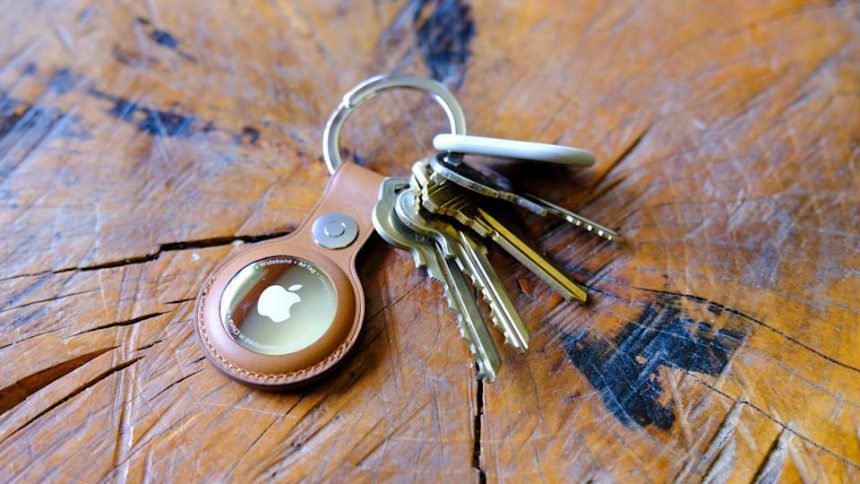
Apple AirTag

Apple AirTag (Engadget)

Attaching your AirTag to everyday items

AirTags don’t have built-in clips or adhesive, so you’ll usually need an accessory to attach one securely. Depending on how you plan to use it, that could mean a key ring, luggage tag, wallet insert or bike mount.

If you’re unsure which style works best, Engadget has rounded up the best Apple AirTag accessories, covering options for keys, bags, wallets and more. Choosing the right accessory helps ensure your AirTag stays attached and works the way you expect.

Wrap-up

After setup, your AirTag will automatically update its location using Apple’s Find My network. You can view its last known location, play a sound to help locate it nearby or use Precision Finding on supported iPhones to guide you directly to it. With just a few minutes of setup and a clear label, an AirTag can become a reliable way to keep track of important belongings, whether you’re at home or on the move.




Source link

Related

You Might Also Like

Nigeria’s data hits 13.2m TB in December as mobile growth plateaus

This 45W Anker Nano charger with smart display is on sale for only $30

Sonos home theater gear is on sale for up to 20 percent off right now

This 512GB Samsung P9 microSD Express card is on sale for 33 percent off

Innovators Lighten up Interswitch Innovation Product Demo Day

heraldtoday February 4, 2026 February 4, 2026
Share This Article
Facebook Twitter Email Print
Previous Article Nigerian church leaders call for action as 86 Christians still held by Islamists Nigerian church leaders call for action as 86 Christians still held by Islamists
Next Article Logo Boxing: The challenges of world champion Christian Mbilli
Leave a comment

Leave a Reply Cancel reply

Your email address will not be published. Required fields are marked *

Follow US

Find US on Social Medias
Facebook Twitter Youtube Instagram

Weekly Newsletter

Subscribe to our newsletter to get our newest articles instantly!

Popular News
Uncategorized

Teaching Disciples Part 1 | Sabbath School Lesson 7 Q3 2024 | 3AMI – 3 Angels Media International

heraldtoday By heraldtoday 1 year ago
DAILY DIVINE ENCOUNTER SERVICE
Channels of Divine Prosperity || Apostle Arome Osayi
APOSTLE AROME OSAYI – WHY YOU NEED PERCEPTION
Gwen Stefani urges Christians to pray this Christmas
- Advertisement -
Ad imageAd image

Confirmed

0

Death

0

More Information:Covid-19 Statistics
Home
Herald Today

“Get yourself up on a high mountain, O Zion, bearer of good news, Lift up your voice mightily, O Jerusalem, bearer of good news; Lift it up, do not fear. Say to the cities of Judah, Here is your God!” Isaiah 40:9. 

  • Categories:
  • Sermons
  • World Christian News
  • Technology
  • Uncategorized
  • Local Church News
  • Health
  • Gospel Music
  • Impact Word
  • Church Events
  • weapons of our warfare

Quick Links

  • About
  • Become A Smartphone Manufacturer
  • Blog
  • Business Home 5
  • Contact
  • Customize Interests
  • Disclaimer
  • Home Business
  • My Bookmarks
  • Privacy Policy
  • SHARE YOUR STORY TO THE WORLD FOR FREE

About US

  • About
  • Contact
  • Privacy Policy
  • Disclaimer

© 2024 | Herald Today

Herald TodayHerald Today
Follow US
© 2024 | Herald Today
  • About
  • Contact
  • Privacy Policy
  • Disclaimer
Welcome Back!

Sign in to your account

Lost your password?
