
By using this site, you agree to the Privacy Policy and Terms of Use.
Accept
Herald Today
  • More
Reading: How to redeem game codes on the Nintendo Switch 2
Share
Notification
Donate
  • Local Church News
    Local Church NewsShow More
    Feature Image 1200 x 628
    Church kidnappings put Nigeria back in Washington’s crosshairs – Africa.com
    1 day ago
    kaduna nigeria
    163 worshippers abducted from two churches in Nigeria
    1 day ago
    C&S Church Demands Action on Abducted Kaduna Worshippers
    C&S Church Demands Action on Abducted Kaduna Worshippers
    1 day ago
    When testimonies meet the law: Why Nigerian churches must pay attention to data privacy
    When testimonies meet the law: Why Nigerian churches must pay attention to data privacy
    1 day ago
    Tech entrepreneur and edtech advocate Nnedinma Obioha shares reasons why technology is no longer optional in Nigeria’s educational sector. - TechCabal
    When testimonies meet the law: Why Nigerian churches must pay attention to data privacy – Businessday NG
    2 days ago
  • World Christian News
    World Christian NewsShow More
    The FACE Act is a weird, unjust law. I've gone to jail for it
    The FACE Act is a weird, unjust law. I’ve gone to jail for it
    3 hours ago
    Why we voted to keep Emir Caner as president of Truett McConnell
    Why we voted to keep Emir Caner as president of Truett McConnell
    4 hours ago
    The Bible forbids using icons in worship: Religious art vs. icon
    The Bible forbids using icons in worship: Religious art vs. icon
    4 hours ago
    6 things to know about the ongoing unrest in Minneapolis
    6 things to know about the ongoing unrest in Minneapolis
    4 hours ago
    Man paints over heretical billboard to read 'Jesus is God'
    Man paints over heretical billboard to read ‘Jesus is God’
    4 hours ago
  • Business
    BusinessShow More
  • Health
    HealthShow More
    FIBROID SURGERY
    2 days ago
    DELICIOUS HEALTHY GREEN SOUP | Recipe for Cold Weather
    5 days ago
    MEDICAL NEGLIGENCE THE HIDDEN TRUTH EXPOSED!
    6 days ago
    SPINE AND KNEE SURGERY
    6 days ago
    The MOST DELICIOUS VEGETARIAN CHILI | Hearty, Nourishing & Comforting
    2 weeks ago
  • Technology
    TechnologyShow More
    Image for the large product module
    Up to 87 percent off ProtonVPN, Surfshark, ExpressVPN, NordVPN and more
    17 minutes ago
    Now you can access Nano Banana, Google's in-house image generator, directly from Chrome. No need to go to the Gemini app.
    Google brings its Nano Banana image generator to Chrome
    35 minutes ago
    You can reach this page by logging into your account on Windscribe.com.
    How to cancel Windscribe and get your money back
    51 minutes ago
    Yves Guillemot, CEO and co-founder of Ubisoft, speaks at the Ubisoft Forward livestream event in Los Angeles, California, on June 12, 2023. The event features a look at upcoming Ubisoft games. (Photo by Robyn Beck / AFP) (Photo by ROBYN BECK/AFP via Getty Images)
    French Ubisoft workers vote to strike
    1 hour ago
    Razer made a web app version of Synapse
    Razer made a web app version of Synapse
    1 hour ago
  • Features
    • Church Events
    • Gospel Music
    • Impact Word
    • Sermons
    FeaturesShow More
    Healing Lives, Restoring Hope
    4 days ago
    Seasons Greetings From Revd. Tony Ogugu
    1 month ago
    Rev. Tony Ogugu: Exemplifying Leadership Through Service and Impact
    4 months ago
    Prophesy Is Fulfilling
    10 months ago
    PFN DELTA STATE INAUGURATES NEW EXECUTIVES
    1 year ago
Reading: How to redeem game codes on the Nintendo Switch 2
Share
Herald TodayHerald Today
Font ResizerAa
Search
  • Business
  • Features
    • Church Events
    • Gospel Music
    • Impact Word
    • Sermons
  • Health
  • Local Church News
  • Technology
  • World Christian News
  • Quick Access
    • About
    • Privacy Policy
    • Donate
Have an existing account? Sign In
Follow US
  • Business
  • Features
  • Health
  • Local Church News
  • Technology
  • World Christian News
  • Quick Access
© 2024 | Herald Today
Herald Today > Blog > Technology > How to redeem game codes on the Nintendo Switch 2
Technology

How to redeem game codes on the Nintendo Switch 2

heraldtoday
Last updated: 2025/12/24 at 1:31 PM
heraldtoday 1 month ago
Share
How to redeem game codes on the Nintendo Switch 2
SHARE


Contents
Things to know before you startHow to redeem a game code on the Switch 2 via the eShopHow to redeem a Switch 2 code onlineWhat to expect after redeeming a codeWhy Switch 2 uses the same redemption system as the original Switch

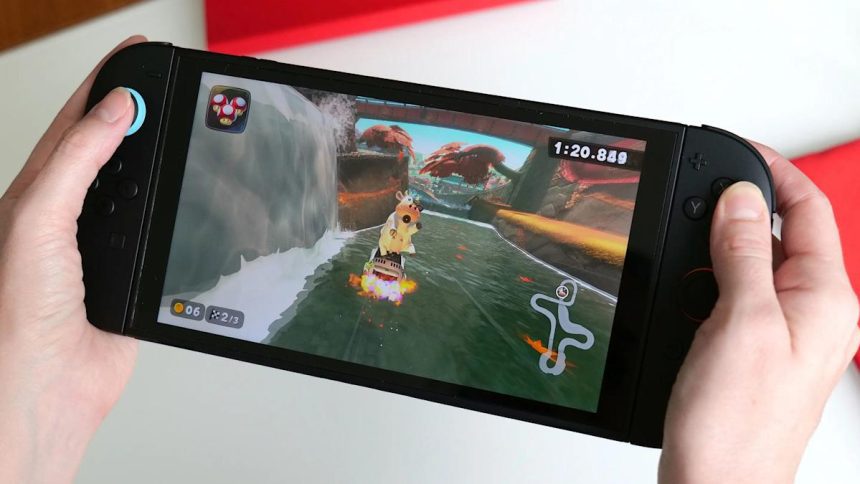
Digital game codes remain one of the simplest ways to add new titles to a Nintendo library. The Nintendo Switch 2 handles code redemption in a familiar way, building on the same process used on the original Switch. You can redeem a download code directly from the eShop on the console, or through a browser on a phone or desktop. Both routes link the purchase to the same Nintendo Account so the redeemed title appears on any compatible device tied to that account. The process is quick once you know where to look. Here is how to redeem game codes on Switch 2 through the console and online.

Things to know before you start

A Nintendo Account is required and the Switch 2 must be connected to the internet for on-device redemption. Most codes contain sixteen characters made up of letters and numbers. The characters are displayed on a physical card, on a receipt or in a confirmation email from a retailer. The characters should be entered exactly as supplied. Each code can only be redeemed once and becomes linked to the Nintendo Account used during the process.

How to redeem a game code on the Switch 2 via the eShop

Redeeming a code through the Switch 2 itself is the most direct approach because the download begins as soon as the code is accepted.

Start on the Switch 2 home screen and open the Nintendo eShop icon. The console will prompt you to choose the user profile that should receive the content. Each user profile has a separate eShop purchase history, so pick the correct one before moving on.

Once the eShop loads, look for the Redeem Code option in the main menu. On the Switch 2, this appears in the left navigation panel alongside the store’s standard browsing categories. Select Redeem Code to open a screen with an input field and the on-screen keyboard.

Enter the sixteen-character code carefully. Codes may contain similar-looking characters particularly when numbers and letters appear in the same sequence. After entering the full set of characters select OK to move forward. The system checks the code and shows a confirmation page with the game or content tied to it.

If the code is valid, select Redeem to finish the process. The game will appear on the home screen as soon as the redemption is complete. A progress bar shows the download status until the installation finishes. If the game includes a Switch and Switch 2 version, the system will prompt you to choose which version to download.

If the game does not begin downloading head to the All Software view or the Download Management screen to confirm the status. The redeemed title should be visible with either a queued or active download.

How to redeem a Switch 2 code online

Nintendo also supports online redemption through its digital store, which is useful if you are away from the console or prefer to type the code on a full keyboard. The redeemed title will still appear in your account’s purchase history and can be downloaded later from the Switch 2.

Open a browser on a phone, tablet or computer and go to the Nintendo Account login page. Sign in using the account linked to your Switch 2. Once logged in navigate to the code redemption page for the Nintendo eShop. This page contains a text box where you can paste or type the code.

Enter the code exactly as provided and select Next. A confirmation screen appears with the game details. Select Redeem to finalize the action. The content is now tied to your account and ready to download on your console.

If the console is in sleep mode and has auto downloads enabled, the game may start downloading immediately. Otherwise open the eShop on the Switch 2 later and check the Download Management section for your queued title.

What to expect after redeeming a code

Every redeemed game becomes part of your Nintendo Account’s digital library. This applies across devices tied to the same account, which means that games purchased on a Switch or a browser will still appear when you sign in on a Switch 2. If the game supports cloud backup through Nintendo Switch Online, save data will sync once the game is installed.

Some games offer separate versions for the original Switch and Switch 2. When this applies, you’ll be asked to pick which version you want to download. The choice does not usually affect your ownership but it determines which software build is installed on the device.

If a code fails, Nintendo advises checking that the characters are entered correctly and confirming that you are using a download code rather than a control number, which often appears on the same card. Codes for DLC downloads require the base game on the destination console. Region restrictions also apply so the code must match the region of your Nintendo Account’s eShop.

Why Switch 2 uses the same redemption system as the original Switch

The Switch 2 keeps the familiar eShop structure that users have relied on since the original console. Keeping this process consistent simplifies the transition for families with multiple consoles and reduces the friction of carrying existing purchases forward. Nintendo Accounts continue to serve as the backbone for digital ownership which makes it easy to claim a code on one device and access the game on another.

The updated interface on the Switch 2 adds clarity to navigation but code redemption still works the same way on both platforms. This continuity ensures that retailers can distribute standard sixteen-character download codes and users can rely on simple steps to activate them.



Source link

Related

You Might Also Like

Up to 87 percent off ProtonVPN, Surfshark, ExpressVPN, NordVPN and more

Google brings its Nano Banana image generator to Chrome

How to cancel Windscribe and get your money back

French Ubisoft workers vote to strike

Razer made a web app version of Synapse

heraldtoday December 24, 2025 December 24, 2025
Share This Article
Facebook Twitter Email Print
Previous Article Nigeria's Christmas in the Shadows Nigeria’s Christmas in the Shadows
Next Article Driving Toyota’s Prius Prime showed me the perks (and problems) with plug-in hybrids Toyota’s Prius Prime saved me gas money but probably not the environment
Leave a comment

Leave a Reply Cancel reply

Your email address will not be published. Required fields are marked *

Follow US

Find US on Social Medias
Facebook Twitter Youtube Instagram

Weekly Newsletter

Subscribe to our newsletter to get our newest articles instantly!

Popular News

How to move Nigeria from food scarcity to security

heraldtoday By heraldtoday 10 months ago
Flickwheel: Revolutionizing Vehicle Maintenance in Nigeria
POWER COMMUNION SERVICE. 14-02-2024
Post-abortive women twice as likely to attempt suicide: study
AU Day; CSO Tasks FG On Education – The Sun Nigeria
- Advertisement -
Ad imageAd image

Confirmed

0

Death

0

More Information:Covid-19 Statistics
Home
Herald Today

“Get yourself up on a high mountain, O Zion, bearer of good news, Lift up your voice mightily, O Jerusalem, bearer of good news; Lift it up, do not fear. Say to the cities of Judah, Here is your God!” Isaiah 40:9. 

  • Categories:
  • Sermons
  • World Christian News
  • Technology
  • Uncategorized
  • Local Church News
  • Health
  • Gospel Music
  • Impact Word
  • Church Events
  • weapons of our warfare

Quick Links

  • About
  • Become A Smartphone Manufacturer
  • Blog
  • Business Home 5
  • Contact
  • Customize Interests
  • Disclaimer
  • Home Business
  • My Bookmarks
  • Privacy Policy
  • SHARE YOUR STORY TO THE WORLD FOR FREE

About US

  • About
  • Contact
  • Privacy Policy
  • Disclaimer

© 2024 | Herald Today

Herald TodayHerald Today
Follow US
© 2024 | Herald Today
  • About
  • Contact
  • Privacy Policy
  • Disclaimer
Welcome Back!

Sign in to your account

Lost your password?
